From Script to Final Video: Complete AI Automation for Dark Channels in 2026
Step-by-step guide to automating the entire dark video production workflow with AI: script, narration, images, subtitles, and final compilation.
Imagine opening your computer, typing in a topic, and in less than an hour having a complete dark video — with a professional script, engaging narration, cinematic images, synchronized subtitles, and final edit ready to publish. In 2026, this isn't science fiction. It's the new production standard for faceless channels.
According to recent data, 83% of content creators already use AI in some part of their workflow, and more than half use it specifically for video production. But the vast majority still do this in a fragmented way — a script here, audio there, images from somewhere else, manual editing at the end. The result? Hours wasted jumping between tools, inconsistent quality, and a production that should take 30 minutes but consumes the entire day.
In this guide, I'll show you exactly how a complete automation pipeline works for dark channels — every step, every tool, and how everything connects to transform an idea into a published video with minimal manual effort.
What Is a Video Automation Pipeline?
A video automation pipeline is a sequential workflow where each production step is executed by AI, automatically feeding into the next one. Instead of using 5 separate tools and copy-pasting between them, everything happens within an integrated system.
For dark channels — which cover true crime, mysteries, horror, conspiracies, and dark psychology — this automation is especially powerful because the faceless format is naturally compatible with AI production. No face on camera, no studio, no equipment. Just quality content generated intelligently.
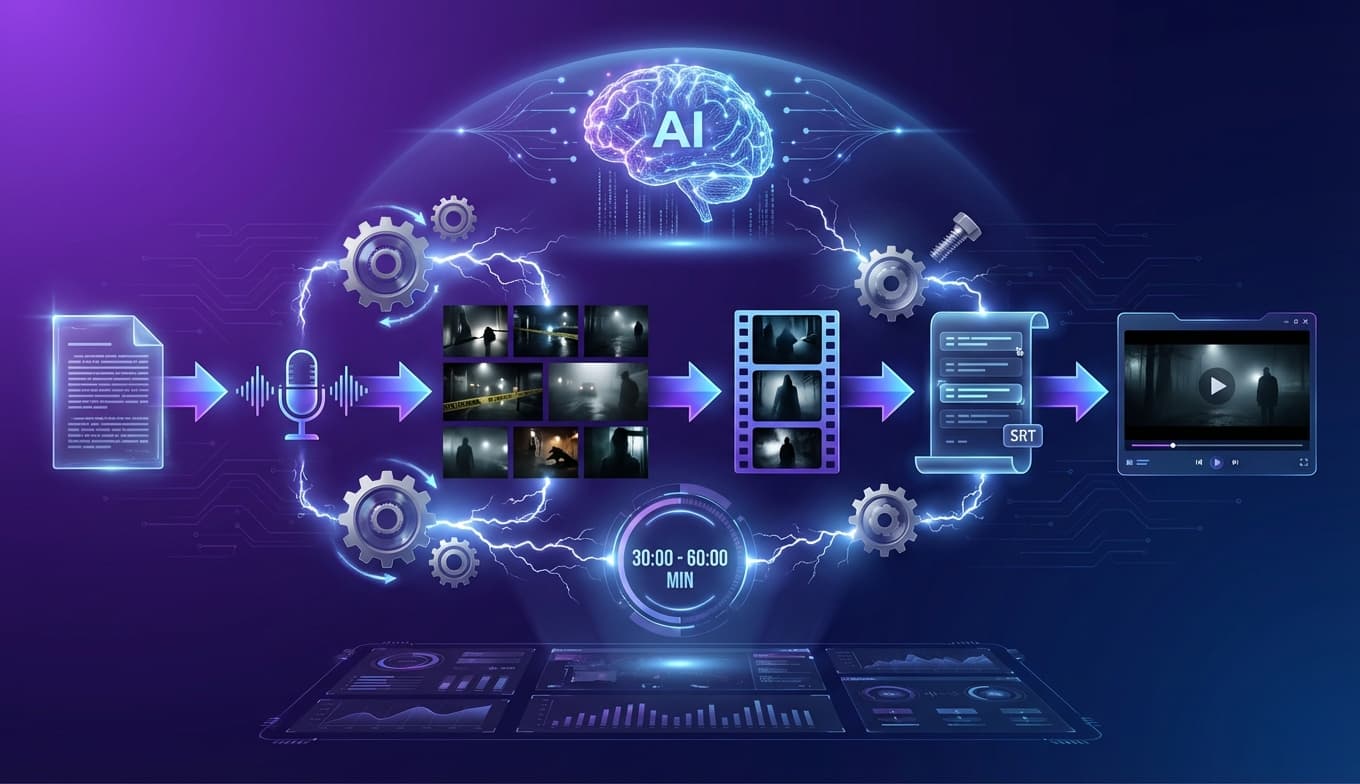
The 6 Stages of the Complete Pipeline
- 1. Script: AI generates a complete script with hook, content blocks, and conclusion
- 2. Narration: Text-to-speech converts the script into professional audio
- 3. Scenes: AI splits the script into visual moments automatically
- 4. Images: Cinematic image generation for each scene
- 5. Subtitles: Automatic transcription generates a synchronized SRT file
- 6. Compilation: Audio + images + subtitles are compiled into the final video
Stage 1: AI Script Generation
Everything starts with the script. And in 2026, generating a high-quality dark script with AI literally takes 2 minutes. But this isn't just any script — we're talking about structured scripts with storytelling techniques that keep the audience hooked from start to finish.
The Two-Phase Approach
The best script generation tools use a two-phase approach that produces far superior results compared to simply "write a script about X":
🎯 Phase 1: Strategy
The AI analyzes the topic and creates a complete strategy: video objective, target audience, angle of approach, narrative structure, and tension points. This ensures the script has clear direction before a single word is written.
📝 Phase 2: Content
With the strategy defined, the AI generates the complete script: opening hook, introduction, content blocks with titles, strategic CTAs, and conclusion. Each section is optimized for retention and engagement.
Structure of a Professional Dark Script
A good dark script follows a specific structure that maximizes retention:
- • Hook (0-15s): A shocking revelation or intriguing question that prevents the viewer from leaving. E.g.: "In 1947, something crashed in the New Mexico desert. The government said it was a weather balloon. But the documents declassified 70 years later tell a very different story."
- • Introduction (15-45s): Quick context that sets the stage and promises value
- • Initial CTA: Subtle subscription request before the main content
- • Content Blocks: 3 to 7 sections, each with a title and developed content, building progressive tension
- • Conclusion: Final reflection, revelation, or cliffhanger that encourages the viewer to watch the next video
- • Final CTA: Direct call-to-action for subscription and next video
💡 Pro Tip
In the dark niche, the hook is responsible for 70% of the viewer's decision to keep watching. Always start with something that generates immediate curiosity — a disturbing fact, an unanswered question, or a contradiction with what everyone believes.
Stage 2: AI Narration Generation
With the script ready, the next step is transforming it into audio. AI voices in 2026 are practically indistinguishable from human narrators — with emotional nuances, dramatic pauses, and intonation that adapts to the content.
Choosing the Right Voice for Dark Content
The voice defines your channel's atmosphere. For dark content, you need voices that convey authority, mystery, and gravitas. Overly animated or high-pitched voices completely break the immersion.
🎙️ For True Crime
Deep voices with a journalistic tone and controlled cadence. Think Netflix documentaries. The narration needs to convey seriousness without being monotonous.
👻 For Horror
Whispered voices or low timbre. The AI can be directed to speak with "suspense" and "mystery," creating an atmosphere that gives chills even without music.
🔍 For Mysteries
Investigative tone, as if the narrator were discovering the information alongside the viewer. Rhythm variations are essential to maintain interest.
🧠 For Dark Psychology
Calm, analytical voice with academic authority. The viewer needs to feel they're learning something profound from someone who masters the subject.
Smart Audio Processing
A huge advantage of AI-generated audio is consistency. Unlike manual recording, there's no volume variation, background noise, or pronunciation errors. The audio comes out clean and ready to use. For longer videos (15+ minutes), the script is divided into blocks that are processed separately and then automatically merged, ensuring uniform quality from start to finish.
Channels using high-quality AI voices report retention rates equal to or higher than channels with human narrators — as long as the voice matches the niche and content tone.
Stage 3: Automatic Scene Detection
Here's a step that most tools completely ignore: the intelligent division of the script into visual scenes. It's not enough to have a script and generate random images. Every moment in the video needs an image that corresponds to what's being narrated at that exact instant.
Scene detection uses AI to analyze the script and identify each "visual moment" — every scene change, every new concept, every turning point in the narrative. The result is a list of scenes with precise visual descriptions that serve as prompts for image generation.
Practical Example: True Crime Case
For a video about a disappearance case, the AI divides the script like this:
- • Scene 1: "Deserted road at night, fog, car headlights in the distance" → Disappearance narration
- • Scene 2: "Police station, stacked files, investigation board" → Start of investigation
- • Scene 3: "Dense dark forest, police crime scene tape" → Evidence discovery
- • Scene 4: "Courtroom, empty defendant's chair, judge's gavel" → Case conclusion
💡 Pro Tip
The golden rule in 2026 is to change the visual every 3 to 5 seconds to keep the viewer engaged. Automatic scene detection respects this rhythm, creating visual transitions that follow the natural flow of the narrative.
Stage 4: AI Image Generation
With scenes identified, each one receives an optimized visual prompt that's sent to an AI image generator. This is the step that gives your channel its visual identity — and it's where many creators go wrong by using generic stock images.
Image Generators for Dark Content
Not all image generators are equal for dark content. Some excel at photorealism, others at cinematic atmospheres. Ideally, you want access to multiple options:
🎬 Sora (OpenAI)
Excellent for realistic cinematic scenes. Generates images with dramatic lighting perfect for true crime and mysteries. Chrome extension integration allows direct use in the production workflow.
🎨 Google ImageFX
Strong with atmospheric landscapes and wide scenes. Ideal for establishing shots — forests, cities at night, abandoned urban scenes. Free with no usage limits.
⚡ Flux Schnell
The fastest on the list. Generates images in seconds, useful for high-volume production. Good overall quality, especially for stylized illustrations and conceptual scenes.
🖼️ DALL-E
Versatile and consistent. Great for creating specific elements like objects, symbols, and detailed compositions. Works well for thumbnails and supporting images.
Visual Styles That Work for Dark Content
The choice of visual style is as important as the content itself. For dark channels, the styles that generate the most engagement are:
- • Cinematic Dark: Dramatic lighting with deep shadows, desaturated colors — perfect for true crime
- • Photorealistic: Ultra-realistic images that look like real photos — ideal for documentaries
- • Horror: Disturbing elements with nightmare atmosphere — exclusive for horror channels
- • Mystery Noir: Film noir aesthetic with high contrast — perfect for unsolved mysteries
- • Digital Art: Stylized digital illustrations — works for dark psychology and conspiracies
- • Vintage: Aged visual, like old documents — excellent for historical cases
Generate Cinematic Images in 12 Different Styles
YT Dark integrates Sora, Google ImageFX, and Flux Schnell into a single platform, with visual styles optimized for each dark niche. Generate perfect images for every scene in your video without leaving the tool.
Get Started Now →Stage 5: Automatic Subtitle Generation (SRT)
Subtitles are no longer optional in 2026. 80% of viewers watch videos with subtitles enabled, and YouTube uses subtitles to better understand your video's content, improving your search ranking.
AI subtitle generation works simply: the narrated audio is automatically transcribed, word by word, with precise timestamps. The result is an SRT file that syncs perfectly with the video.
❌ Without Subtitles
- • Loses 80% of viewers watching on mute
- • YouTube can't understand the audio content
- • SEO hurt — fewer organic discoveries
- • Reduced accessibility — excludes deaf audience
✅ With AI Subtitles
- • Retains viewers in any environment
- • YouTube indexes all spoken content
- • Improves organic search ranking
- • +98% accuracy with AI-generated audio
A unique advantage of generating subtitles from AI audio (instead of human recording) is that transcription accuracy is significantly higher. Without background noise, accent variations, or stammering, AI transcription achieves accuracy rates above 98%.
Stage 6: Final Assembly and Compilation
The final stage is where everything comes together: the narrated audio, images for each scene, synchronized subtitles, and transitions are automatically compiled into an MP4 video ready for publication.
The automatic compilation works like this:
- 1. Synchronization: The system aligns each image with the corresponding audio segment, using scene timestamps
- 2. Transitions: Smooth effects (dissolve, fade, slow zoom) are applied between scenes to avoid harsh cuts
- 3. Subtitles: The SRT file is embedded in the video as a synchronized text layer
- 4. Rendering: The final video is exported in high quality (1080p or 4K), ready for upload
The result is a video with a professional documentary look — exactly what dark content viewers expect. The difference between an AI-assembled video and one manually edited by a professional is shrinking every day in 2026.
Partial vs. Full Automation
Not every creator needs (or wants) to automate 100% of production. There are different levels of automation, and understanding which one works for you is essential:
Partial Automation
You use AI for 1-2 steps and do the rest manually.
- • Pros: More creative control, greater customization
- • Cons: 4-8 hours per video, hard to scale
- • Best for: 1-2 videos per week, creators who enjoy editing
Full Automation
The entire workflow is managed by AI, from script to compilation.
- • Pros: 30-60 min per video, scalable, consistent
- • Cons: Less granular control, tool costs
- • Best for: 3+ videos per week, multiple channels
Complete Workflow in Practice: Step by Step
Let's see how full automation works in practice, from zero to published video:
Step 1: Define the Topic (2 minutes)
Choose the video subject. For dark content, research cases generating interest — ongoing trials, recent documentaries, anniversary dates of famous cases. Enter the topic, channel style, and desired duration into the generation tool.
Step 2: Generate Script (2-3 minutes)
The AI first creates the strategy (target audience, angle, structure) and then the complete script. Review the result — adjust points you consider weak, add information only you know, and ensure the facts are correct.
Step 3: Generate Narration (3-5 minutes)
Select the voice that matches your niche and generate the audio. For longer videos, the system automatically splits into blocks and merges at the end. Listen to the result and adjust speed or tone if needed.
Step 4: Process Scenes (1-2 minutes)
The AI analyzes the script and splits it into visual scenes automatically. Each scene receives a detailed visual description that will be used as a prompt to generate images. Check if the division makes narrative sense.
Step 5: Generate Images (5-15 minutes)
Choose the image generator (Sora, ImageFX, Flux) and visual style (Cinematic Dark, Horror, Mystery Noir, etc.). Images are generated for each scene simultaneously. Replace any image that didn't turn out well — just regenerate with one click.
Step 6: Generate Subtitles (1-2 minutes)
The audio is automatically transcribed, generating an SRT file with word-by-word timestamps. Accuracy is extremely high when the audio comes from AI (no noise, no variable accent).
Step 7: Compile Video (5-10 minutes)
Audio + images + subtitles are compiled automatically. The system synchronizes everything, applies smooth transitions, and renders the final video in high quality. Download the MP4 and publish on YouTube.
⏱️ Total Time: 20-40 Minutes
From topic to finished video in less than an hour. Compare that with the 6-10 hours that manual production requires. This means you can publish one video per day working less than 1 hour — or scale to multiple channels with the same effort you used to dedicate to a single video.
Integrated Tools vs. Separate Tools
One of the biggest decisions you'll face is: use a platform that integrates everything or build your own stack with individual tools?
❌ Fragmented Stack
- • ChatGPT for script → copy text
- • ElevenLabs for audio → download MP3
- • Midjourney for images → download one by one
- • CapCut for editing → assemble manually
- • Result: 3+ hours, 5 tabs open, zero integration
✅ Integrated Platform
- • Script generated within the platform
- • Audio processed automatically
- • Images generated per scene with 1 click
- • Automatic final video compilation
- • Result: 30-60 min, single interface, everything connected
The advantage of an integrated platform isn't just time savings — it's consistency. When all elements are generated within the same ecosystem, the script directly feeds the narration, which feeds scene detection, which feeds image generation. There's no context loss between steps.
Complete Pipeline in a Single Platform
YT Dark offers the entire integrated automation workflow: AI scripting (Gemini), ElevenLabs narration, scene detection, image generation (Sora + ImageFX + Flux), SRT subtitles, and final compilation. All in one interface built specifically for dark channels.
Try Free →Scaling: From 1 to 5+ Videos Per Week
The true power of automation shows when you scale. With an optimized pipeline, publishing more videos doesn't mean working more hours — it means running more processes in parallel.
Batch Production Strategy
Instead of producing one video at a time, produce in batches:
- • Monday: Research 5 topics and generate 5 scripts (30 min total)
- • Tuesday: Review scripts and generate 5 narrations (1 hour total)
- • Wednesday: Process scenes and generate images for all 5 videos (2 hours total)
- • Thursday: Compile all 5 videos and generate subtitles (1 hour total)
- • Friday to Sunday: Schedule publications throughout the following week
Total: ~4.5 hours for 5 videos — less than 1 hour per video, with the entire following week covered.
Automated Editorial Calendar
With batch production running, the next level is having a visual editorial calendar where you can see all scheduled videos, drag to reorder publication dates, and track each one's status (draft → scheduled → published). This transforms your channel from an improvised hobby into a professional operation.
Common Automation Mistakes (And How to Avoid Them)
Automation is powerful, but it has pitfalls. Here are the most common mistakes that destroy automated channels:
⚠️ 5 Fatal Automation Mistakes
- 1. Publishing without reviewing: AI generates high-quality content, but incorrect facts in true crime or horror videos can destroy your credibility. Always verify factual information before publishing.
- 2. Using generic voices: A voice that doesn't match the niche breaks immersion immediately. Test multiple voices before defining your channel's sound identity.
- 3. Repetitive images: If all videos use the same style and scenes, the channel looks "made by a robot." Vary visual styles and image generators between videos.
- 4. Ignoring SEO: Video automation doesn't replace optimization. Titles, descriptions, tags, and thumbnails still need to be strategic for the algorithm to deliver your content.
- 5. Volume without quality: YouTube penalizes channels with low-retention videos. One excellent video per week beats 5 mediocre ones. Use automation to improve quality, not just quantity.
YouTube Policies for AI Content in 2026
A legitimate concern for every creator using AI: will YouTube demonetize my channel?
The short answer: no, as long as you follow the rules. The July 2025 YouTube policy update made it clear that AI-generated content is allowed and monetizable, as long as:
- • Unique value: The video offers something a human viewer considers valuable
- • Not repetitive: Each video is genuinely different from the others
- • Not spam: No mass production of identical content with minor variations
- • Disclosure: Content with realistic AI that could be confused with real people must be identified
Dark channels using intelligent automation — with original scripts, quality narration, and relevant visuals — are completely within the rules. What YouTube fights is "inauthentic content": generic videos, low-quality slideshows, and automated spam.
How Much Does It Cost to Automate a Dark Channel?
The cost depends on production volume and chosen tools. Here's a realistic estimate for 2026:
💰 Basic Production (2 videos/week)
Fragmented stack with free and paid tools:
- • ChatGPT Plus: ~$20/month
- • ElevenLabs Starter: ~$5/month
- • Image generation: $0-10/month
- • Manual editing: your time
Total: $25-35/month + hours of work
🚀 Automated Production (3-5 videos/week)
Integrated platform with complete pipeline:
- • All-in-one platform: $10-40/month
- • Extra credits (if needed): $10-20/month
- • Editing: automatic
- • Time saved: 15+ hours/week
Total: $20-60/month + minimal work
Considering that a monetized dark channel can generate between $200 and $2,000+ per month, the investment in automation pays for itself quickly — usually in the first or second month of monetization.
The Future of Automation for Dark Channels
What we see in 2026 is just the beginning. Trends point toward:
- • Full generative video: Instead of static images, AI generating real video for each scene (Sora already enables this in a limited way)
- • Autonomous agents: AIs that research topics, generate scripts, and publish videos completely on their own, without any human interaction
- • Real-time personalization: Videos that adapt to the viewer — different narrations or visuals based on user profile
- • Automatic multi-language: A single video automatically translated and dubbed into 10+ languages, multiplying global reach
Creators who master automation now will have an enormous competitive advantage when these technologies mature. The best time to start automating your dark channel is today.
Frequently Asked Questions
How long does it take to produce a fully automated dark video with AI?
With a well-configured pipeline, you can go from script to finished video in 30 to 60 minutes. The script takes about 2 minutes, audio between 3 and 5 minutes, images 5 to 15 minutes depending on the number of scenes, and final compilation another 5 to 10 minutes.
Do I need to know how to code to automate video production?
No. Tools like YT Dark offer the entire integrated pipeline without any coding required. You click buttons to generate each step. For more advanced automations, visual tools like n8n exist, but most creators can produce complete videos without writing any code.
Does YouTube monetize videos made entirely with AI?
Yes, as long as the content offers unique value to viewers. YouTube prohibits "inauthentic content" (repetitive, low-quality videos), but videos with original scripts, quality narration, and relevant visuals are normally eligible for monetization.
What is the monthly cost to automate a dark channel with AI?
It depends on production volume. On average, a channel publishing 2 to 3 videos per week spends between $20 and $60 per month considering all tools involved. With an integrated platform like YT Dark, costs can be even lower thanks to the credit-based system.
Can I use the same automation for different dark niches?
Yes. The automation pipeline works for any dark niche: true crime, horror, mysteries, conspiracies, or dark psychology. What changes is the narration style, script tone, and visual style of the images.
What is the difference between partial and full automation?
In partial automation, you use AI for one or two steps and do the rest manually. In full automation, the entire workflow is managed by AI: from script to final compilation. Full automation reduces production time by up to 90%.
Are AI-generated subtitles accurate enough?
Yes. Modern AI transcription tools achieve over 95% accuracy. Since the audio is AI-generated (no background noise or accent variations), subtitle accuracy is even higher, typically above 98%.
Frequently Asked Questions
How long does it take to produce a fully automated dark video with AI?
With a well-configured automation pipeline, you can go from script to finished video in 30 to 60 minutes. The script takes about 2 minutes, audio between 3 and 5 minutes, images 5 to 15 minutes depending on the number of scenes, and final compilation another 5 to 10 minutes.
Do I need to know how to code to automate video production?
No. Tools like YT Dark offer the entire integrated pipeline without any coding required. You click buttons to generate each step. For more advanced automations, visual tools like n8n exist, but most creators can produce complete videos without writing any code.
Does YouTube monetize videos made entirely with AI?
Yes, as long as the content offers unique value to viewers. YouTube prohibits 'inauthentic content' (repetitive, low-quality videos), but videos with original scripts, quality narration, and relevant visuals are normally eligible for monetization.
What is the monthly cost to automate a dark channel with AI?
It depends on production volume. On average, a channel publishing 2 to 3 videos per week spends between $20 and $60 per month considering all tools involved. With an integrated platform like YT Dark, costs can be even lower thanks to the credit-based system.
Can I use the same automation for different dark niches?
Yes. The automation pipeline (script → audio → images → video → subtitles) works for any dark niche: true crime, horror, mysteries, conspiracies, or dark psychology. What changes is the narration style, script tone, and visual style of the images.
What is the difference between partial and full automation?
In partial automation, you use AI for one or two steps (e.g., just the script or audio) and do the rest manually. In full automation, the entire workflow is managed by AI: from script to final compilation, including subtitles and thumbnail. Full automation reduces production time by up to 90%.
Are AI-generated subtitles accurate enough?
Yes. Modern AI transcription tools like AssemblyAI achieve over 95% accuracy. Since the audio is AI-generated (no background noise or accent variations), subtitle accuracy is even higher, typically above 98%.
Ready to Create Videos with AI?
Use YT Dark to create professional videos 10x faster. Scripts, images and narration automated.
Start Now →